Voxelwright AI
Guide: install Voxelwright AI, connect Claude and build
To use Voxelwright AI, the free Minecraft mod where an AI builds from a sentence, you install Minecraft 26.3 with a mod loader (Fabric, Forge or NeoForge), the Voxelwright AI file and Claude Code, then connect your Claude account. This guide walks through each step and takes about fifteen minutes, once.
Last updated
What do you need to use Voxelwright AI?
To use Voxelwright AI you need Minecraft: Java Edition 26.3, a mod loader (Fabric, Forge or NeoForge), Java 25, and a Claude Pro, Max, Team or Enterprise subscription with Claude Code. The same Voxelwright AI file works with all three loaders, and Voxelwright AI itself is free. Which loader to pick.
- Minecraft: Java Edition 26.3. Minecraft is now numbered by year: 26 means 2026, and there is no 1.26. Only 26.3 and its fixes (26.3.1 and so on) work, not 1.21.x, 26.1 or 26.2.
- A mod loader: Fabric, Forge or NeoForge. Fabric: Loader 0.19.5 or later, and Fabric API (required). Forge: 66 or later. NeoForge: 26.3.0.52-beta or later (NeoForge for 26.3 is a beta). Forge and NeoForge need nothing else. Quilt loads Fabric mods and should work (not tested). Bedrock Edition is not supported.
- What has been tried. Voxelwright AI has been played and tested by people with Fabric, Forge and NeoForge. Forge and NeoForge are new in this version: they also ran in automated runs of the real game on a Mac (Apple Silicon), from a profile made by each loader's official installer, started by a script that imitates a launcher. Those runs did not use a real launcher, and dictation with a real microphone has not been tried on Forge and NeoForge. If something goes wrong, tell us: the contact address is on the legal notice.
- Java 25, which the launcher usually brings.
- A Claude subscription: Pro, Max, Team or Enterprise, with Claude Code installed and signed in (steps 1 and 3). The free plan does not include Claude Code.
- Windows, macOS or Linux. It has been played and tested by people on all three, including macOS (Apple Silicon) with Fabric. The automated tests also pass on Windows 10 and on Linux (Intel/AMD and ARM).
- Nothing to buy and nothing to sign up for: Voxelwright AI is free, with no account and no licence key.
How does Voxelwright AI work?
Voxelwright AI turns what you write or say into blocks in your world, in four steps:
- You write or say what you want: press K, then describe it in your own words.
- The mod hands your request to your own Claude Code, signed in with your subscription. Nothing goes through a Voxelwright AI server.
- Claude plans the build and places the blocks in your world, through the mod's tools.
- You watch it appear, and you can undo it with the Undo button or with
/undo.
- How long it takes: a hut takes about a minute, a castle many minutes. In Settings, under Level of detail, choose Quick, Detailed or Masterpiece: the higher the level, the longer it takes.
- Stay safe: the AI can run any game command, so back up your worlds. A build can be undone; what a command changes cannot always be undone.
Install Claude Code
Voxelwright AI talks to Claude through Claude Code, Anthropic's own program. Install it once, on the computer you play on. New to terminals? Anthropic's terminal guide shows how to open one and paste a command.
macOS and Linux
curl -fsSL https://claude.ai/install.sh | bashWindows, in PowerShell
irm https://claude.ai/install.ps1 | iexWindows, in Command Prompt (CMD)
curl -fsSL https://claude.ai/install.cmd -o install.cmd && install.cmd && del install.cmd- Instead, on macOS you can use Homebrew:
brew install --cask claude-code. - Instead, on Windows you can use WinGet:
winget install Anthropic.ClaudeCode.
- Paste the command for your system and press Enter. You do not need to run it as an administrator.
- When it ends, open a new terminal window, then run the command below. A version number means Claude Code is installed.
claude --versionInstall the mod
Four things to do: set up Minecraft 26.3 with Fabric, Forge or NeoForge (A), download the files (B), put them in the mods folder (C), start the game (D). The same Voxelwright AI file works with all three loaders. Forge and NeoForge are new: What you need says what has and has not been tried.
A. Set up Minecraft 26.3 with Fabric: official Minecraft Launcher
- Download the installer from the Fabric installer page: on Windows the .exe (it needs no Java of its own), on macOS and Linux the Universal / .JAR file. On macOS and Linux, Java must already be installed to run it.
- Close Minecraft and its launcher, then open the installer. On Linux, run
java -jarfollowed by the name of the downloaded file in a terminal. On macOS, if Apple says it cannot verify the file, open System Settings, then Privacy & Security, and click Open Anyway. - In the installer, choose Minecraft version 26.3, keep the latest Loader version it proposes (Voxelwright AI needs 0.19.5 or later), make sure Create Profile is ticked, and click Install.
- Open the Minecraft Launcher, choose the new Fabric profile (bottom left of the list) and click Play, then quit: Fabric is installed.
A. Set up Minecraft 26.3 with Forge: official Minecraft Launcher
- Run the official Minecraft Launcher at least once first: the Forge installer needs its profile list and says “Please run the Minecraft launcher first” without it.
- Open the Forge download page for Minecraft 26.3 and download the Installer of the latest version (we tried 26.3-66.0.9; Voxelwright AI needs Forge 66 or later). It is a .jar file, so Java must already be installed to run it.
- Close Minecraft and its launcher, then open the installer: double-click it, or run
java -jarfollowed by the name of the downloaded file in a terminal. Choose Install client and confirm. - Open the Minecraft Launcher, choose the new Forge profile and click Play, then quit.
A. Set up Minecraft 26.3 with NeoForge: official Minecraft Launcher
- Run the official Minecraft Launcher at least once first: the NeoForge installer needs its profile list and says “Please run the Minecraft launcher first” without it.
- Open neoforged.net: its first section is the installer download. Choose Minecraft version 26.3 and the newest NeoForge version it lists (we tried 26.3.0.52-beta; Voxelwright AI needs it or later, and NeoForge for 26.3 is still a beta). It is a .jar file: Java must already be installed to run it.
- Close Minecraft and its launcher, then open the installer: double-click it, or run
java -jarfollowed by the name of the downloaded file in a terminal. Choose Install client and confirm. - Open the Minecraft Launcher, choose the new NeoForge profile and click Play: NeoForge shows its own red beta warning on the title screen. Then quit.
A. Set up Minecraft 26.3 with your loader: Prism Launcher, Modrinth App, CurseForge, Lunar Client
- Prism Launcher: click Add Instance at the top (or right-click an empty area and choose Create instance), then choose Minecraft 26.3 and your mod loader: Fabric, Forge or NeoForge. If Prism does not offer your loader for 26.3, use the official launcher and the installers above. For Java 25, see Prism's Installing Java page.
- Modrinth App: create an instance with Minecraft 26.3 and your loader (Fabric, Forge or NeoForge, if the app offers it for 26.3) (Modrinth's help).
- CurseForge app: in the Minecraft section, click Create, name the profile, and choose Minecraft 26.3 and your mod loader (Fabric, Forge or NeoForge, if the app offers it for 26.3) (CurseForge's help).
- Lunar Client: launch Minecraft 26.3 with Fabric. We have not checked Lunar Client with Forge or NeoForge. Lunar's menus change from one version to the next: if you cannot find the option, see Lunar's own help.
B. Download the files
- In the Install section, click the download button: the file is called
voxelwright-followed by the version number and.jar, the same for Fabric, Forge and NeoForge. - Only with Fabric: open the Fabric API versions on Modrinth, already filtered on Minecraft 26.3 and Fabric, and download the newest file whose name ends with +26.3 (for example
fabric-api-0.163.0+26.3.jar), not another version. Prism, the Modrinth App and CurseForge can also download it from their own mod search: choose the same kind of file. With Forge or NeoForge, skip this: they need nothing else.
C. Put it in the mods folder
The Voxelwright AI .jar goes in the mods folder of the profile or instance you will play with (with Fabric, the Fabric API .jar goes there too). Keep only the newest voxelwright-*.jar and delete any older file of the mod (earlier versions were named craftai-….jar). If there is no mods folder yet, start the game once with that profile: Forge and NeoForge create it on that first launch, and the Fabric installer creates it. If it is still missing, create a folder named mods in the game folder.
| Launcher | Where the mods folder is |
|---|---|
| Official Minecraft Launcher | Windows: %appdata%\.minecraft\mods (paste it in the address bar of the file explorer). macOS: ~/Library/Application Support/minecraft/mods (in Finder, choose Go, then Go to Folder, and paste it). Linux: ~/.minecraft/mods. |
| Lunar Client | ~/.lunarclient/profiles/26/mods/fabric-26.3, the Fabric folder, checked on a Mac. On Windows and Linux the same .lunarclient folder should be in your user folder; that has not been checked. |
| Prism Launcher | One folder per instance. Right-click the instance, choose Edit, open the Mods tab and drag the Voxelwright AI .jar file into it (and, with Fabric, the Fabric API one): that tab shows the instance's mods folder. |
| Modrinth App | One folder per instance, inside the app's own folder (%AppData%\ModrinthApp\ on Windows, ~/Library/Application Support/ModrinthApp/ on macOS, ~/.local/share/ModrinthApp/ on Linux). Open the instance's own mods folder from the app (see Modrinth's help). |
| CurseForge app | One folder per profile. Open the profile's mods folder from the app (see CurseForge's help). |
D. Start the game, and check that it worked
- Start Minecraft 26.3 with the Fabric, Forge or NeoForge profile or instance you put the file in, not a plain Minecraft one.
- Open a world: a singleplayer world, or a multiplayer server where you can use
/filland/setblock. - Press K. The Voxelwright AI panel opens over the game: it worked. You can change the key in Options → Controls.
Connect your Claude account
The mod checks your Claude account for you and, if it is not connected, lets you connect it without leaving the game.
From the game (the easy way)
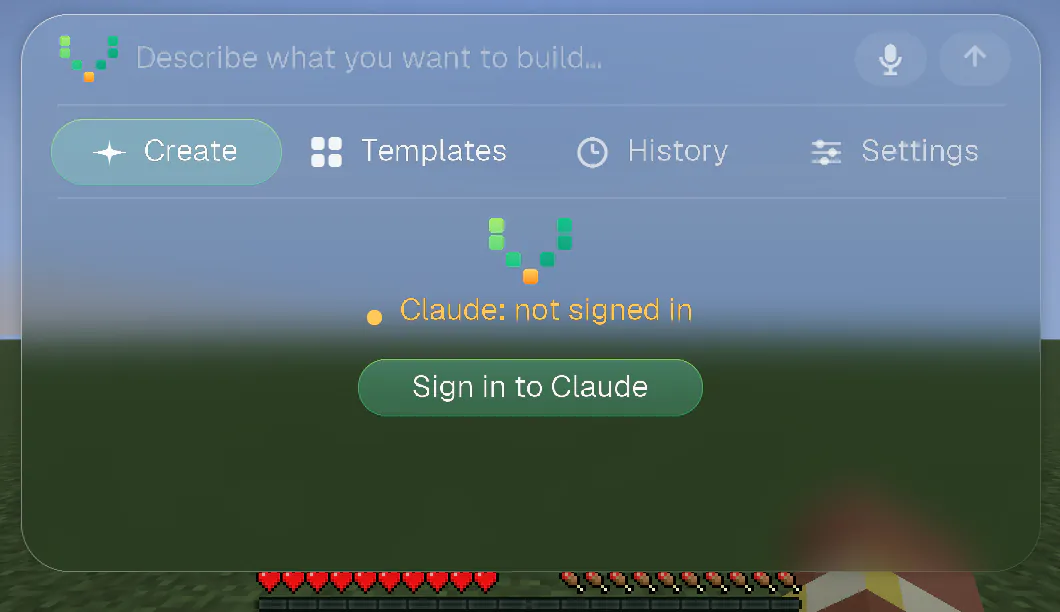
- Open a world and press K. The welcome screen names your Claude account. If it says Claude: not signed in, click Sign in to Claude.
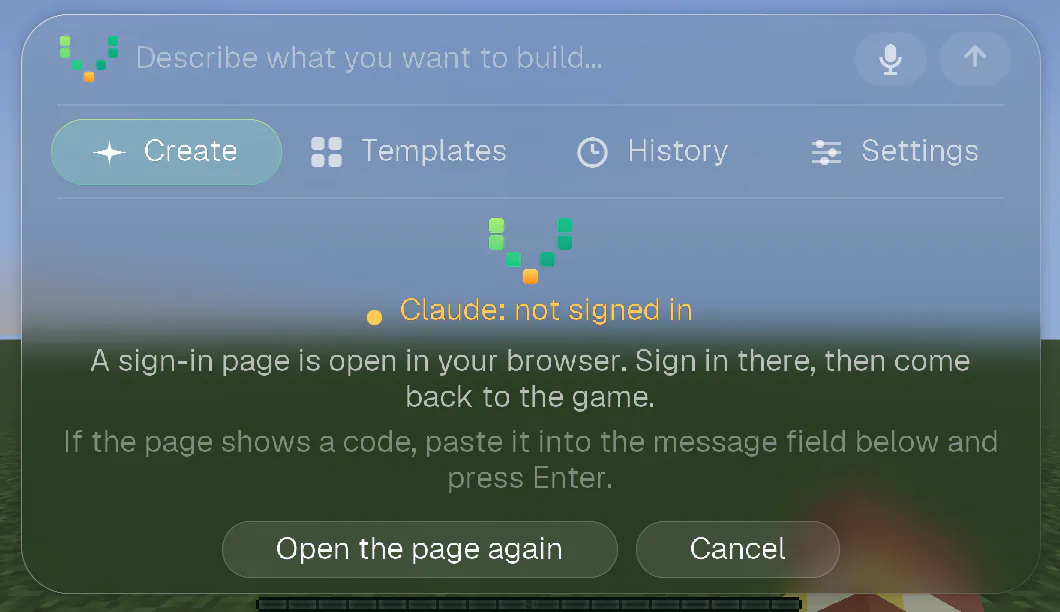
- Your browser opens on Claude's sign-in page. Sign in with the account that has your subscription and approve. If the page did not open, click Open the page again.
- Come back to the game: it notices by itself. If the page shows a code instead of finishing, paste the code in the message field of the panel and press Enter: it goes straight to Claude Code, never to the AI.
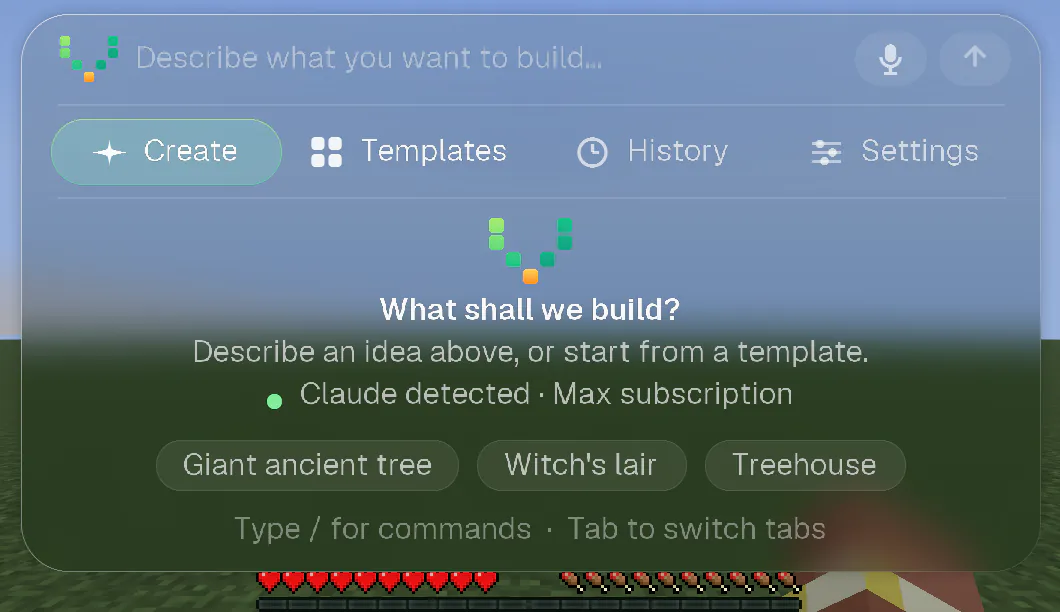
- Check: the welcome screen now says Claude detected · Max subscription (or Pro, Team, Enterprise).
From a terminal
- Open a terminal and run
claude. - Type
/loginand choose your Claude account (the one with the subscription). - Sign in in the browser, then come back to the game.
What the mod checks, and when
- Before every request you send, and when you come back to the game window (for example after signing in in the browser or a terminal).
- Every 10 seconds while the panel shows a problem, and every 3 minutes otherwise. If your account signs out while you play, the conversation tells you once.
What the panel says, and what to do
| The panel says | What it means, and what to do |
|---|---|
| Claude detected · Max subscription | All good. You can build. |
| Claude: not signed in | Claude is installed but nobody is signed in. Click Sign in to Claude. |
| Claude Code not found | Claude Code is not installed, or the mod cannot find it. Click How to install it, or see step 1. |
| Claude: free plan, Pro or Max needed | Your Claude account is on the free plan, which does not include Claude Code. Upgrade to Pro or Max (the button My Claude account takes you to your account). |
| Claude: API key, not your subscription | Claude Code is signed in with an API key, and Voxelwright AI uses your subscription. In a terminal, run claude, type /logout, then /login and choose your Claude account. |
| Claude: could not check | Claude Code did not answer. Usually it is temporary: wait a moment and open the panel again. If it lasts, see Troubleshooting below. |
Your first build
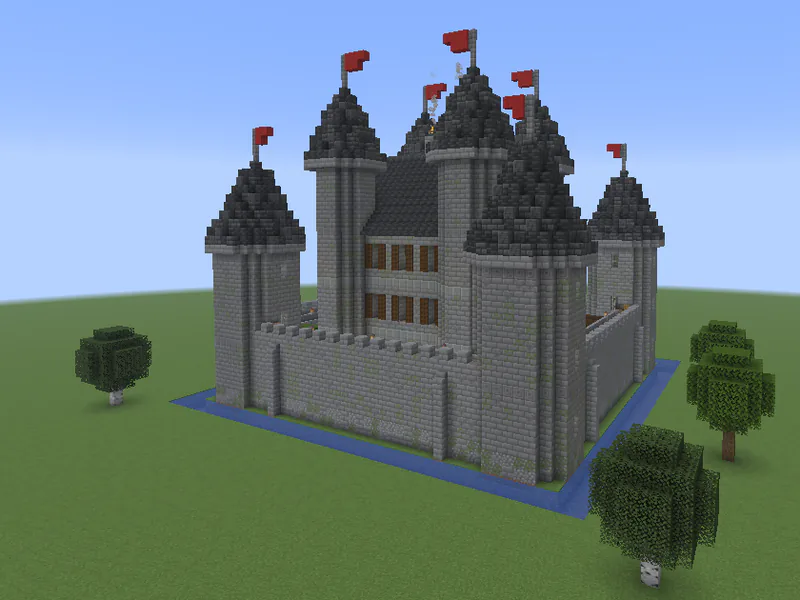
Your first build takes one sentence: press K, describe what you want, press Enter and watch it appear. To write a more precise request, see how to write a good request.
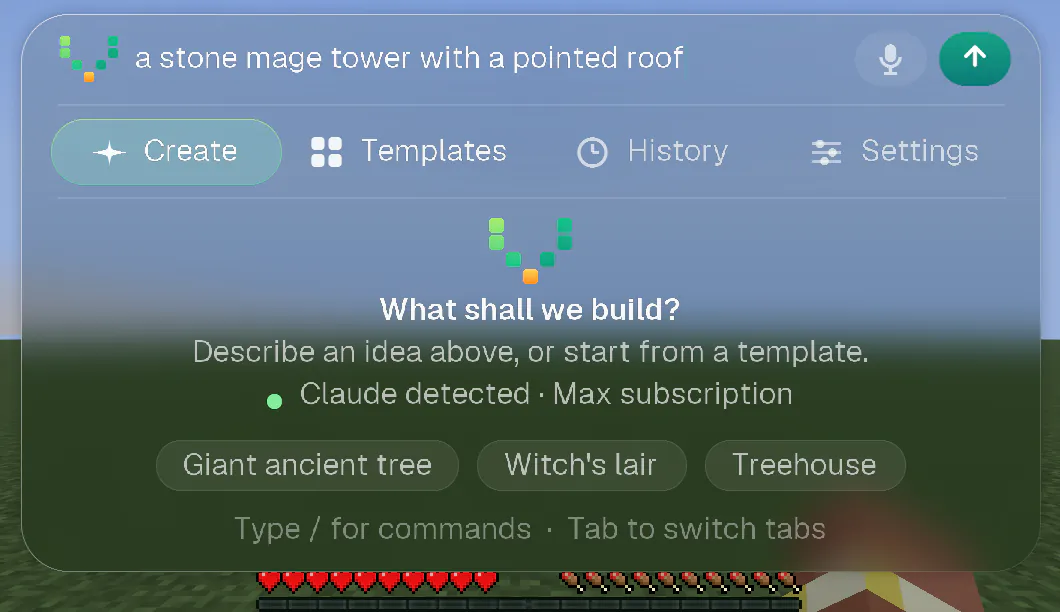
- Press K. In the field at the top (“Describe what you want to build…”), describe what you want, in any language: “a stone mage tower with a pointed roof”.
- Press Enter. The capsule at the top of the screen shows the progress. You can close the panel and keep playing.
- The build appears block by block. A short animation plays when it is done.
- Not what you wanted? Type
/undo, or open the History tab. Describe what to change and try again.
Tips for better builds
- Look at the place where you want it and say “here” or “over there”.
- To build inside an exact area, select a zone with
/zone wand. On a multiplayer server, look at two corners and use/zone 1and/zone 2.
Go further
- Voice: hold V, say what you want, let go. Your words become the request. It runs on your computer: your voice never leaves it.
- Undo and redo:
/undo,/redo, or the History tab. Type/in the field to see every command. - Model: choose the Claude model in Settings, or with
/model. - Multiplayer: it works on servers where you are allowed to use
/filland/setblock. Nothing is installed on the server: the mod builds from your computer, with your rights. A player who is not an operator builds at about one command per second. - Updates: the mod tells you when a new version is out, and one click installs it, with Fabric, Forge and NeoForge (tried by automated runs on a Mac). The update replaces the old file, so the mods folder keeps exactly one Voxelwright AI file, and the previous version goes to
config/craftai-update/previous. The game keeps running the old version until you restart it. Type/updateto check. - Learn more: how to build in Minecraft with an AI, how to write a good request, real builds with their request and time, building by voice, using it on a multiplayer server and Fabric, Forge or NeoForge for Minecraft 26.3.
Troubleshooting
The game does not start, or an error window appears.
I press K and nothing happens.
NeoForge says Voxelwright AI is a Fabric mod and cannot be loaded, or Forge does not list it.
config/craftai-update/previous, outside the mods folder.The game says the mod is incompatible, or asks for another Minecraft version.
There are two Voxelwright AI files in my mods folder.
My launcher does not offer Minecraft 26.3.
The Claude Code install command gives an error.
The token '&&' is not a valid statement separator, you pasted the Command Prompt one: use the PowerShell one. If Command Prompt says 'irm' is not recognized, you pasted the PowerShell one. A prompt that starts with PS is PowerShell. For any other error, see Anthropic's installation troubleshooting.I clicked Sign in to Claude and nothing opened.
I signed in, but the game still says Claude is not signed in.
claude then /login in a terminal.It says Claude Code is not found, but I installed it.
claude --version: if that fails, the installation itself is the problem (see the question above). If it works, a launcher may not pass your PATH on: set the CRAFTAI_CLAUDE_PATH environment variable to the full path of the claude program. On Windows, install Claude Code in Windows itself, not in WSL.It says API key, not your subscription.
claude, type /logout, then /login and choose your Claude account. The mod never replaces your sign-in by itself.It says free plan.
A request fails right away.
Voice mode does not work.
libgomp1 package (libgomp on Fedora and Arch). A Windows or Linux microphone has not been tried by a person yet.